Lecture 3 - Hello Git!
The problem with "manual" version control
- Storage space (due to redundancy)
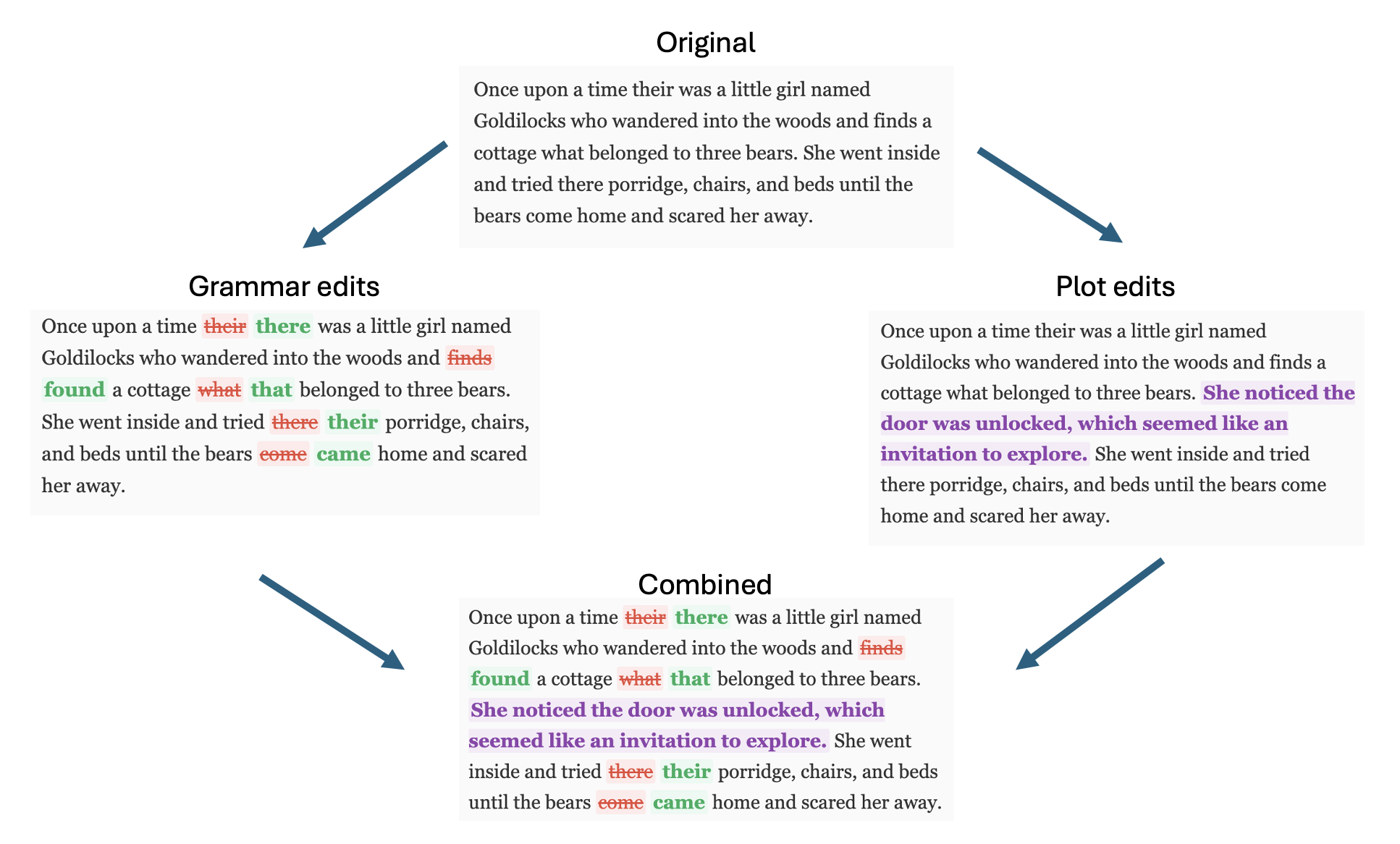
- Hard to see what changes were made when
- Hard to collaborate (merge, review)
The collaboration problem
Learning Objectives
By the end of this lecture, you should be able to:
- Understand why version control is critical for programming
- Configure Git for first-time use
- Create repositories and make meaningful commits
- Connect local repositories to GitHub
- Use the basic Git workflow for individual projects
- Use the
gitcommandsclone,checkout,add,commit,push,pull,merge
Warning - this is a lot to take in at once, but we will be practicing and developing this ALL semester
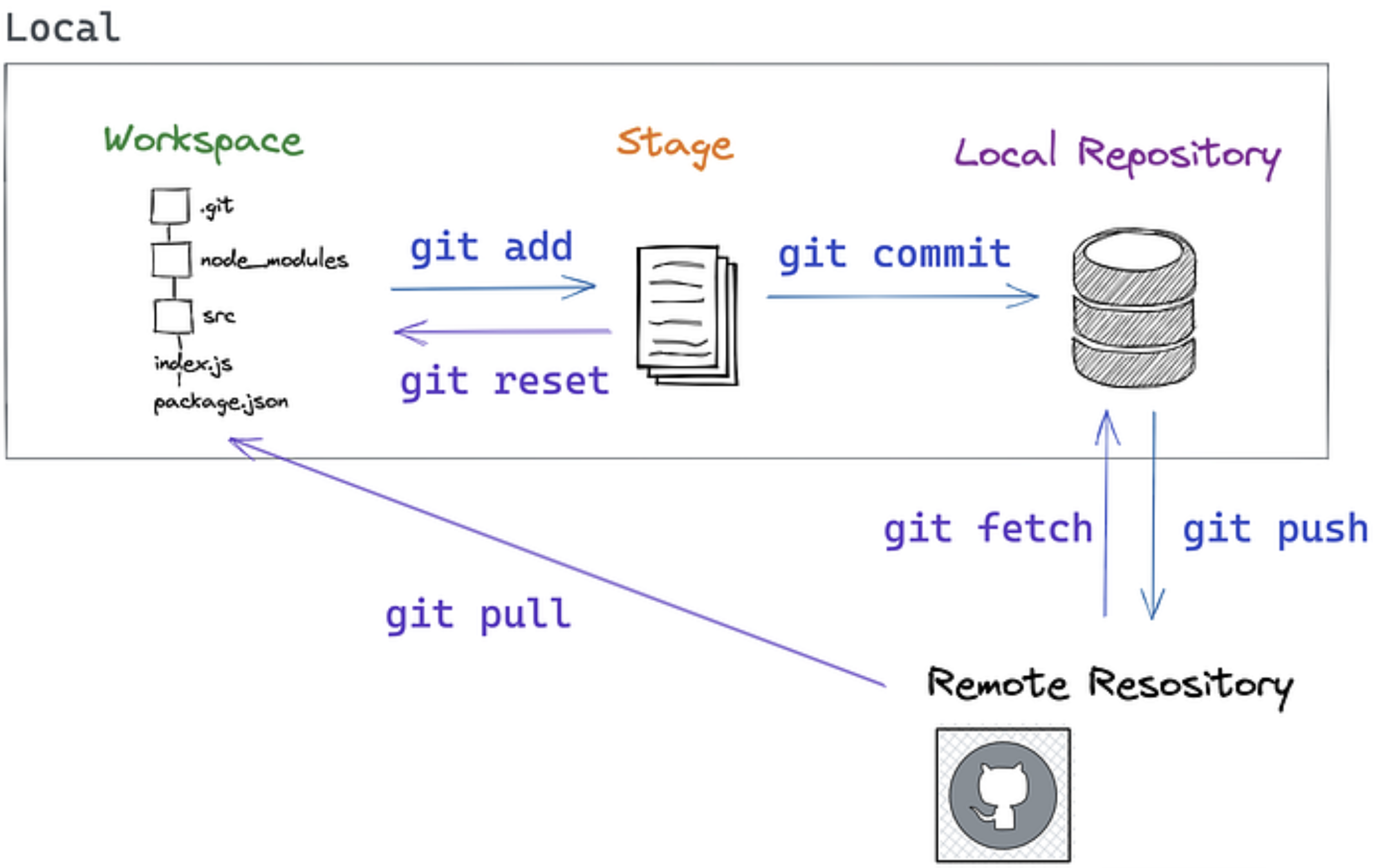
The Four (and a half) Locations
Repository (Repo): A folder tracked by Git, containing your project and its complete history.
Workspace The files on your machine right now, where we edit them
Staging Area Temporary holding spot for changes before committing
Local repository Where we store committed changes locally
Remote repository A server (like GitHub) for storing and collaborating on code
Git workflow concepts
Commit: A snapshot of your project at a specific moment, with a message explaining what changed.
Diff: The collection of specific edits in a commit. (Or generally, the differences between any two versions of a file.)
Branch: One "timeline" of commits that may diverge from other timelines
Git Workflows
Merging and Pull Requests
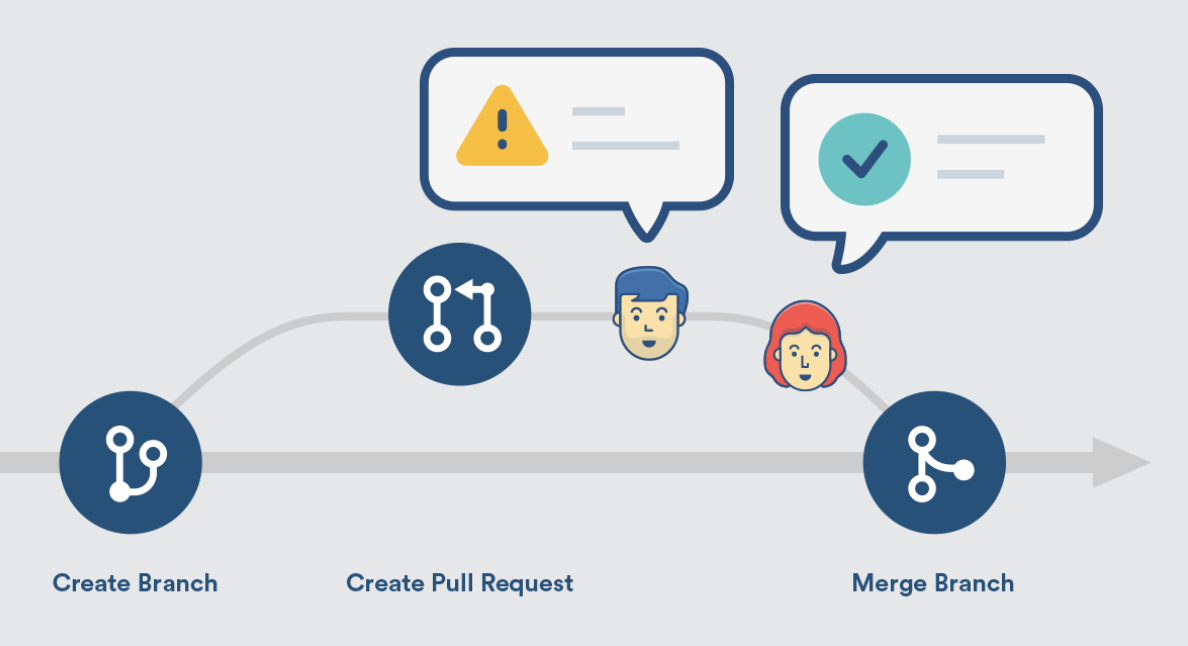
Merge: Combines changes from different branches. Takes commits from one branch and integrates them into another branch.
Merge Conflict: Merging may fail if both branches change the same lines. Git will point to the conflict and ask you to resolve it before finishing the merge.
Pull Request (PR): A request to merge your changes into another branch, typically used for code review. You "request" that someone "pull" your changes into the main codebase.
Git Branching
- Main branch: Usually called
main(ormasterin older repos) - Feature branches: Created for new features or bug fixes
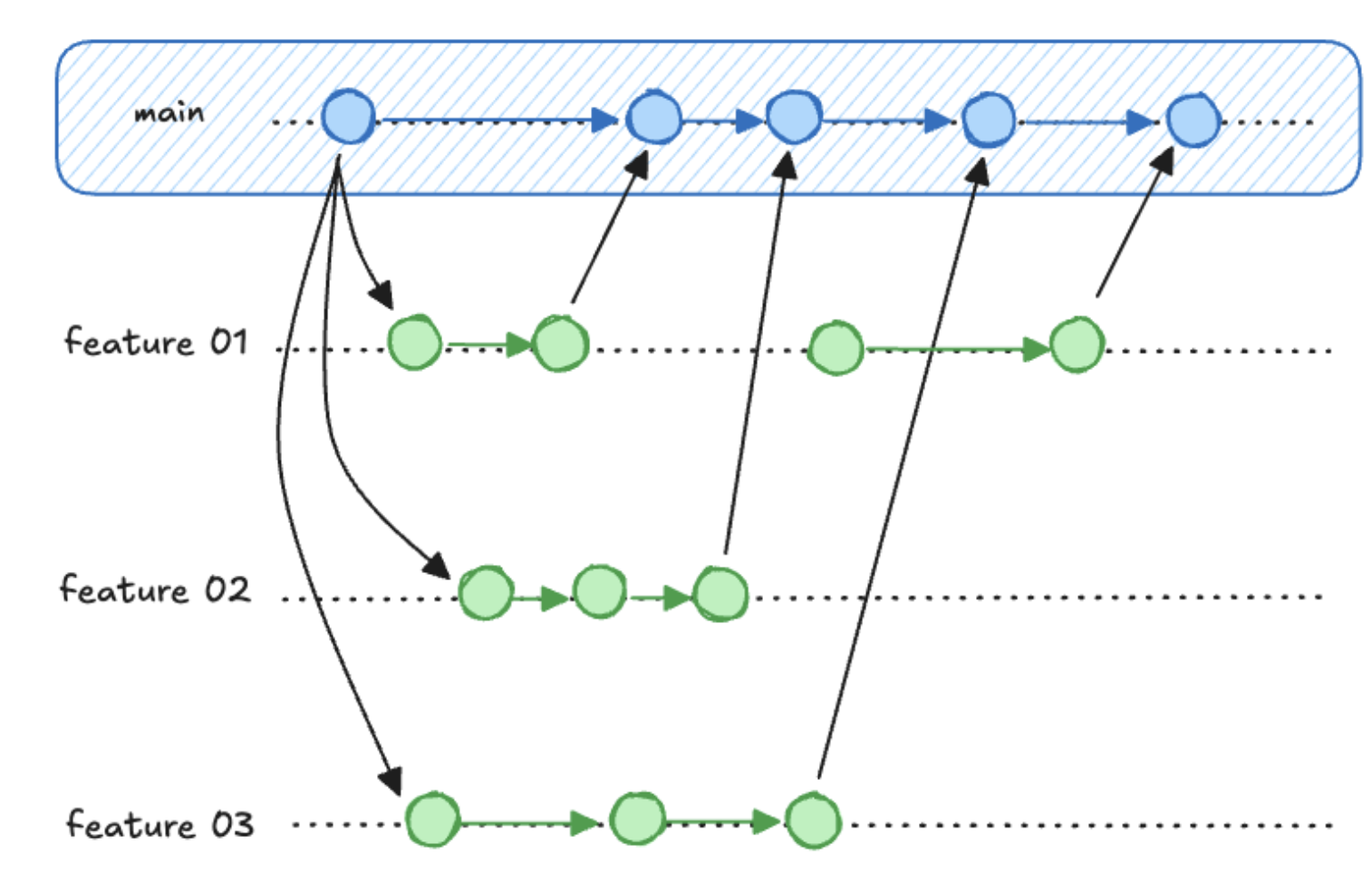
- Isolates experimental work
- Enables parallel development
- Facilitates code review
Essential Git Commands
Let's take this to the command line.
One-Time Setup
# Configure your identity (use your real name and email)
git config --global user.name "Your Full Name"
git config --global user.email "your.email@example.com"

# Set default branch name
git config --global init.defaultBranch main
Note: The community has moved away from
masteras the default branch name, but it may still be default in some installations.
Starting a New Project - Demo/Practice (shout it out)
- Where am I?
- How can I move to my projects directory?
- How can I create a new project?
- How can I move into the project?
git init- What did that do?
A note about .gitignore
Anything in your repo you DON'T want tracked in git as part of you repo can go in the .gitignore file.
latexfile.aux
.ipynb_checkpoints/
.vscode
.DS_Store
/tmp
If you ever run git add and notice it added a bunch of files you don't recognize - it's time to update your .gitignore
Daily Git Workflow
# Create a descriptive branch name for the change you want to make
git checkout -b feature_branch

# Check what's changed
git status                    # See current state

# Stage changes for commit
git add filename.rs          # Add specific file to staging
git add .                    # Add all changes in current directory

git commit -m "Add calculator function" # Commit with a comment

git checkout main # Switch back to main
git merge feature_branch # Merge branch back into main
# merge merges the branch you NAME *into* the branch you're currently ON
Writing Good Commit Messages
- Start with a present / imperative verb
- Be brief and specific
- If you find yourself using "and" a lot your commits are too big
The Golden Rule: Your commit message should complete this sentence: "If applied, this commit will [your message here]"
Good Examples:
git commit -m "Add input validation for calculator"
git commit -m "Fix division by zero error"
git commit -m "Refactor string parsing for clarity"
git commit -m "Add tests for edge cases"
Bad Examples:
git commit -m "fix a bug"        # What bug
git commit -m "fix date range bug and added multi-user feature"  # Too much at once
git commit -m "trying again"    # what are you doing differently?
Working with GitHub
Why GitHub?
- Remote backup for solo work
- Easy sharing and collaboration
- Many tools and integrations
Connecting to GitHub
You CAN create a repo locally then push it to GitHub:
git init
git remote add origin https://github.com/yourusername/repository-name.git
git push -u origin main
But you can also create it from GitHub and clone it locally - what we'll usually do
# Clone existing repository
git clone https://github.com/username/repository.git
To keep things in sync your main actions are
# Get to the repository
cd repository

# Pull any changes from GitHub
git pull

# Push your commits to GitHub
git push # you'll be prompted at this point to log into github in your terminal
Git, GitHub, and shell together - Demo
# Creating a new repo
cd ~/ds210/assignments
mkdir assignment_01
cd assignment_01
git init

# Make a branch
git checkout -b problem1

# Make initial commit
touch README.md
echo "# Assignment 1" > README.md
git add README.md
git commit -m "Initial project setup for Assignment 1"

# Work and commit frequently
# ... write some code ...
mkdir src
touch src/main.rs
echo "some rust code" > src/main.rs
git add src/main.rs
git commit -m "Implement basic data structure"

# Merge back to the main branch
git checkout main
git merge problem1

# Push changes to GitHub
git remote add origin https://github.com/yourusername/repository-name.git
git push -u origin main
git push
Common Git Scenarios
"I made a mistake in my last commit message"
git commit --amend -m "Corrected commit message"
I want to undo a git add
git reset
"I want to undo changes I haven't committed yet"
git checkout -- filename.rs    # Undo changes to specific file
git reset --hard               # Undo ALL uncommitted changes (CAREFUL!)
I want to do something else
git log    # shows commit history
git branch # shows available branches
git rebase # is an alternative to merge
git fetch  # is like git pull but doesn't include a merge
Search and stack overflow are you friends here!
Resources for learning more and practicing
- Interactive online Git tutorial that goes a bit deeper: https://learngitbranching.js.org/
- A downloadable app with tutorials and challenges: https://github.com/jlord/git-it-electron
- Another good tutorial (examples in ruby): https://gitimmersion.com/
- Pro Git book (free online): https://git-scm.com/book/en/v2