Lecture 30 - File I/O and Concurrency
Logistics
- This is the last lecture on Rust implementation!
- Next we switch to algorithm theory and graph algorithms
- No handouts today - notes are posted online already though.
Key dates:
- Stack/heap and hand-coding redo later today
- Corrections in discussion on Tuesday
- HW6 due in a week
Learning objectives
By the end of today, you should be able to (with a reference):
- Read and write files in Rust for data processing
- Use NDArray for numerical computing (like NumPy)
- Have working examples you can adapt for your own projects
And without a reference:
- Understand basic concepts of concurrency
- Know when concurrency might help
- Use
par_iterto add concurrency easily in Rust
Part 1: File I/O
Why file I/O matters
In data science, you're always:
- Loading datasets (CSV, JSON, text files)
- Saving results
- Processing log files
- Reading configurations
Rust makes file I/O safe - no reading freed memory, no forgetting to close files, fewer surprise type parsing issues
Read a whole file to a string
use std::fs;

fn main() {
    // Read entire file into a String
    let contents = fs::read_to_string("data.txt") // takes relative path
        .expect("Could not read file");

    println!("File contents:\n{}", contents);
}
That's it! File is automatically closed when contents goes out of scope.
Error handling: .expect() panics if file doesn't exist. For real code, use match or ?:
#![allow(unused)]
fn main() {
use std::fs;
use std::io;

fn read_file(path: &str) -> io::Result<String> {
    let contents = fs::read_to_string(path)?;
    Ok(contents)
}
}
Writing to a File
use std::fs;

fn main() {
    let data = "Results:\n42\n100\n256\n";

    fs::write("output.txt", data)
        .expect("Could not write file");

    println!("Data written!");
}
Simple! Overwrites file if it exists, creates if it doesn't.
Processing files line by line
For large files, don't load everything into memory:
use std::fs::File;
use std::io::{BufRead, BufReader};

fn main() {
    let file = File::open("data.txt").expect("Could not open file");
    let reader = BufReader::new(file);  // Buffer reads chunks efficiently

    for line in reader.lines() { // creates an iterator!
        let line = line.expect("Could not read line");
        println!("Line: {}", line);
    }
}
So... what is a buffer?
A buffer is temporary storage in memory for data being transferred
In Computer Systems Generally:
Think of a buffer as a "waiting area" for data:
- Video streaming: Buffer loads upcoming seconds of video so playback is smooth
- Printing: Print buffer holds documents waiting to print
- Copy/paste: Clipboard is a buffer holding your copied data
So... what is a buffer?
In File I/O:
Without buffering (slow):
Program asks: "Give me byte 1"    -> Disk reads byte 1
Program asks: "Give me byte 2"    -> Disk reads byte 2
Program asks: "Give me byte 3"    -> Disk reads byte 3
Each disk read takes ~5-10 milliseconds!
With buffering (fast):
Program asks: "Give me byte 1"   -> Disk reads bytes 1-8192 into buffer
Program asks: "Give me byte 2"   -> Already in buffer! (instant)
Program asks: "Give me byte 3"   -> Already in buffer! (instant)
...
Program asks: "Give me byte 8193" → Disk reads next 8192 bytes
Key insight: Disk I/O is ~100,000x slower than RAM access. Buffers reduce disk reads dramatically!
BufReader in Rust
#![allow(unused)]
fn main() {
let file = File::open("data.txt")?;
let reader = BufReader::new(file);  // Wraps file with 8KB buffer
}
BufReader reads chunks from disk and serves your program from RAM.
Practical example: Parse a data file
use std::fs::File;
use std::io::BufReader;

fn parse_numbers(filename: &str) -> Vec<i32> {
    let file = File::open(filename).expect("Could not open file");
    let reader = BufReader::new(file);

    let mut numbers = Vec::new();

    for line in reader.lines() {
        // First, check if we can read the line
        let text = match line {
            Ok(text) => text,
            Err(_) => continue, // Skip lines with read errors
        };

        // Now try to parse the text as a number
        let parse_result = text.trim().parse::<i32>();
        match parse_result {
            Ok(num) => numbers.push(num),
            Err(_) => {} // Skip lines that aren't valid numbers
        }
    }

    numbers
}

fn main() {
    let data = parse_numbers("numbers.txt");
    println!("Read {} numbers", data.len());
    println!("Sum: {}", data.iter().sum::<i32>());
}
Writing results to CSV
use std::fs::File;
use std::io::Write;

fn save_results(filename: &str, data: &[(String, i32)]) -> std::io::Result<()> {
    let mut file = File::create(filename)?;

    writeln!(file, "name,score")?;  // Header

    for (name, score) in data {
        writeln!(file, "{},{}", name, score)?;
    }

    Ok(())
}

fn main() {
    let results = vec![
        ("Alice".to_string(), 95),
        ("Bob".to_string(), 87),
        ("Charlie".to_string(), 92),
    ];

    save_results("results.csv", &results)
        .expect("Could not save results");
}
For real CSV parsing, use the csv crate - much more robust!
Part 2: NDArray - NumPy for Rust
If you need NumPy-like functionality in Rust:
[dependencies]
ndarray = "0.15"
Quick example:
#![allow(unused)]
fn main() {
use ndarray::prelude::*;

let a = array![1.0, 2.0, 3.0, 4.0];
let b = array![5.0, 6.0, 7.0, 8.0];

// Element-wise operations
let sum = &a + &b;           // [6, 8, 10, 12]
let product = &a * &b;       // [5, 12, 21, 32]

// Aggregations
println!("Mean: {}", a.mean().unwrap());
}
When to use:
- Multi-dimensional arrays (matrices, tensors)
- Linear algebra and statistics
- Scientific computing
Not on homework or exam - just for your reference if you need it!
Part 3: Concurrency concepts (TC 12:35)
Cores and threads
Your computer has multiple cores:
- Core: A physical processing unit in your CPU that can execute instructions
- Thread: A sequence of instructions that can run independently
- Think of cores as workers, threads as tasks they can do
How many cores do you have?
- Laptop: 4-16 cores
- Server: 32-128 cores
- GPU: thousands of cores!
To use them all, you need concurrent programming
- One thread = one core doing work
- Multiple threads = multiple cores working in parallel
Example: Processing 1 million images
- Single thread (1 core working): 1 hour
- 8 threads (8 cores working): ~7.5 minutes
Reality check: Limits and challenges
Amdahl's Law: Parallelism has limits
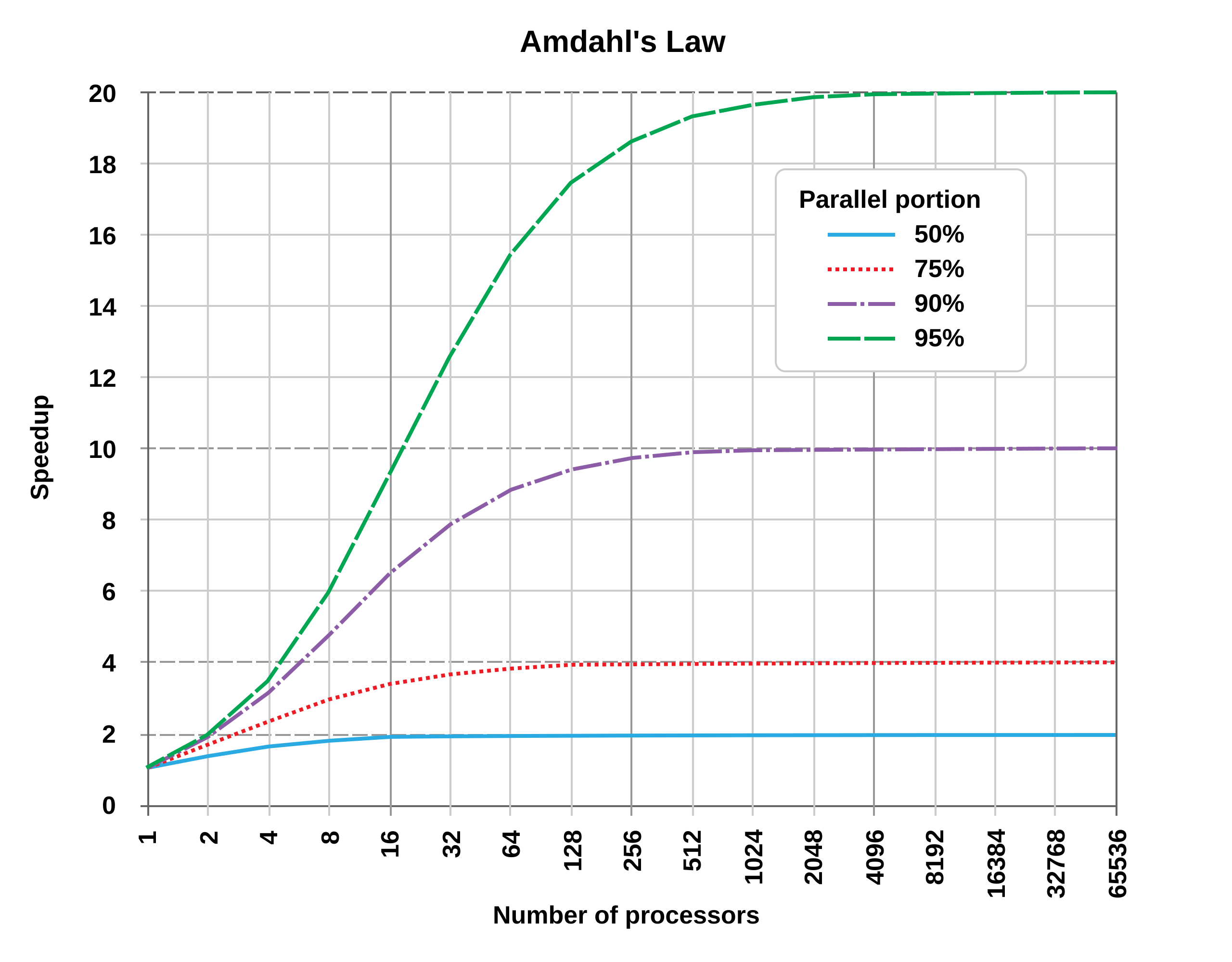
Not all code can be parallelized! If 50% of your program must run sequentially:
- 1 core: 100 seconds total
- 2 cores: 50 seconds parallel + 50 sequential = 75 seconds (1.33x speedup, not 2x!)
- ∞ cores: 0 seconds parallel + 50 sequential = 50 seconds (2x speedup maximum)
Key insight: The sequential portion limits your speedup, no matter how many cores you add.
Why parallel code is hard to write:
- Race conditions: Multiple threads accessing shared data can interfere with each other
- Deadlocks: Threads waiting for each other can freeze the program
- Difficult debugging: Bugs may only appear sometimes (non-deterministic)
- Overhead: Creating/coordinating threads takes time and memory
- Not all problems parallelize well: Some tasks are inherently sequential
Bottom line: Concurrency is powerful but requires careful design!
Visualizing a data race
#![allow(unused)]
fn main() {
// BROKEN CODE (doesn't compile in Rust, thank goodness!)
let mut counter = 0;

thread 1: counter = counter + 1;
thread 2: counter = counter + 1;
}
What happens:
Time    Thread 1         Thread 2        Counter
----    --------         --------        -------
t0                                       0
t1      Read: 0
t2                       Read: 0         0
t3      Add 1: 1
t4                       Add 1: 1        0
t5      Write: 1                         1
t6                       Write: 1        1  ← Should be 2!
Result: Lost update! This is a data race.
Other concurrency bugs
Deadlock
Thread 1          Thread 2
--------          --------
Lock A            Lock B
Lock B (wait...)  Lock A (wait...)
Both stuck forever!
Use-After-Free (in unsafe languages)
Thread 1                Thread 2
--------                --------
Use data
                        Free data
Use data again <- Crash!
These bugs are:
- Hard to reproduce (timing-dependent)
- Hard to debug (non-deterministic)
- Cause production failures
How Rust prevents concurrency bugs
Remember the borrow checker?
It prevents concurrency bugs at compile time!
Rules that help:
- Ownership: Can't have two owners (can't have unsynchronized access)
- Borrowing: Can't have
&mutwhile&exists (prevents races) - Lifetimes: References can't outlive data (prevents use-after-free)
The same rules that made single-threaded code safe make concurrent code safe!
Concurrency patterns
Rust supports three main approaches to concurrent programming:
1. Message Passing
When to use: Background tasks that produce results
Example scenario: Download a file while the main program continues
Main thread:  "Hey worker, download this URL"
              ... continues doing other work ...
Worker thread: ... downloads file ...
Worker thread: "Done! Here's the file data"
Main thread: Receives the data and processes it
Safe because: Threads don't share data - they pass ownership through messages
2. Shared State with Locks (Mutex)
When to use: Multiple threads need to update the same counter or shared resource
Example scenario: Web server counting requests
Thread 1: Lock counter -> Read: 100 -> Increment -> Write: 101 -> Unlock
Thread 2: (waiting for lock...)
Thread 2: Lock counter -> Read: 101 -> Increment -> Write: 102 -> Unlock
Thread 3: (waiting for lock...)
Safe because: Only one thread can access the data at a time
3. Data Parallelism
When to use: Processing large amounts of independent data
Example scenario: Apply a filter to 1 million images
Thread 1: Process images 1-250,000
Thread 2: Process images 250,001-500,000
Thread 3: Process images 500,001-750,000
Thread 4: Process images 750,001-1,000,000
-> 4x faster! Each thread works on different data
Safe because: Each thread works on separate chunks, no sharing
All safe because of Rust's type system!
Manual concurrency tools (advanced) (TC 12:45)
If you need fine-grained control over threads, Rust provides:
Manual thread creation
std::thread::spawnto create
Message Passing:
std::sync::mpsc
Shared State:
Arc<Mutex<T>>
BUT: These are complex and easy to get wrong!
Better option for most cases: Use the rayon crate (next slide)
- Automatic parallelism
- Much simpler to use
- Handles threading for you
The Rayon crate: Easy parallelism
For simple cases, use the rayon crate:
[dependencies]
rayon = "1.7"
use rayon::prelude::*;

fn main() {
    let data: Vec<i32> = (1..=1000).collect();

    // Parallel iterator - automatically uses all cores!
    let sum: i32 = data.par_iter()
        .map(|x| x * x)
        .sum();

    println!("Sum: {}", sum);
}
Just change .iter() to .par_iter() to get automatic parallelism!
Summary
File I/O:
- Use
fs::read_to_string()for simple file reading - Use
BufReaderfor efficient line-by-line processing - Buffers reduce disk I/O by reading chunks into memory
- Always handle errors with
Resultand?
Concurrency:
- Multiple cores can work in parallel for speedup
- Amdahl's Law: Sequential portions limit maximum speedup
- Rust prevents data races and concurrency bugs at compile time
- Use
rayonandpar_iter()for easy parallelism
When to use concurrency:
- Processing independent data items (images, records)
- Long-running computations that can be split
- NOT worth it for small tasks (overhead > benefit)