Overview of Programming languages
Learning Objectives
- Programming languages
- Describe the differences between a high level and low level programming language
- Describe the differences between an interpreted and compiled language
- Describe the differences between a static and dynamically typed language
- Know that there are different programming paradigms such as imperative and functional
- Describe the different memory management techniques
- Be able to identify the the properties of a particular language such as rust.
Various Language Levels
-
Native code
- usually compiled output of a high-level language, directly executable on target processor
-
Assembler
- low-level but human readable language that targets processor
- pros: as fine control as in native code
- cons: not portable
-
High level languages
- various levels of closeness to the architecture: from C to Prolog
- efficiency:
- varies
- could optimize better
- pros:
- very portable
- easier to build large projects
- cons:
- some languages are resource–inefficient
Assembly Language Examples
  ARM                          X86
. text                       section .text
.global _start                 global _start
_start:                      section .data
   mov r0, #1                msg db  'Hello, world!',0xa
   ldr r1, =message          len equ 0xe
   ldr r2, =len              section .text
   mov r7, #4                _start:
   swi 0                     mov edx,len ;message length
   mov r7, #1                mov ecx,msg ;message to write
                             mov ebx,1   ;file descriptor (stdout)
.data.                       mov eax,4   ;system call number (sys_write)
message:                     int 0x80    ;call kernel
   .asciz "hello world!\n"   mov ebx,0   ;process' exit code
len = .-message.             mov eax,1   ;system call number (sys_exit)
                             int 0x80    ;call kernel - this interrupt won't return
Interpreted vs. compiled
Interpreted:
- An application (interpreter) reads commands one by one and executes them.
- One step process to run an application:
python hello.py
("Fully") Compiled:
- Translated to native code by compiler
- Usually more efficient
- Two steps to execute:
- Compile (Rust:
rustc hello.rs) - Run (Rust:
./hello)
- Compile (Rust:
Compiled to Intermediate Representation (IR):
- Example: Java
- Portable intermediate format
- Needs another application, Java virtual machine, that knows how to interpret it
- Example: Python
- Under some circumstances Python bytecode is created and cached in
__pycache__ - Python bytecode is platform independent and executed by the Python Virtual Machine
- Under some circumstances Python bytecode is created and cached in
Just-in-Time (JIT) compilation is an interesting wrinkle in that it can take interpreted and intermediate format languages and compile them down to machine code.
Type checking: static vs. dynamic
Dynamic (e.g., Python):
- checks if an object can be used for specific operation during runtime
- pros:
- don't have to specify the type of object
- procedures can work for various types
- faster or no compilation
- cons:
- slower at runtime
- problems are detected late
Consider the following python code.
def add(x,y):
    return x + y

print(add(2,2))
print(add("a","b"))
print(add(2,"b"))
    4
    ab

    ---------------------------------------------------------------------------

    TypeError                                 Traceback (most recent call last)

    Cell In[1], line 6
          4 print(add(2,2))
          5 print(add("a","b"))
    ----> 6 print(add(2,"b"))


    Cell In[1], line 2, in add(x, y)
          1 def add(x,y):
    ----> 2     return x + y


    TypeError: unsupported operand type(s) for +: 'int' and 'str'
There is optional typing specification, but it is not enforced, e.g. accepting ints.
import typing
def add(x:str, y:str) -> str:
    return x + y
print(add(2,2))    # doesn't complain about getting integer types
print(add("ab", "cd"))
#print(add(2,"n"))
    4
    abcd
- You can use packages such as
pyrightormypyas a type checker before running your programs - Supported by VSCode python extension
Type checking: static vs. dynamic
Static (e.g, C++, Rust, OCaml, Java):
- checks if types of objects are as specified
- pros:
- faster at runtime
- type mismatch detected early
- cons:
- often need to be explicit with the type
- making procedures generic may be difficult
- potentially slower compilation
C++:
int add(int x, int y) {
    return x + y;
}
Rust:
#![allow(unused)]
fn main() {
fn add(x:i32, y:i32) -> i32 {
    x + y
}
}
Type checking: static vs. dynamic
Note: some languages are smart and you don't have to always specify types (e.g., OCaml, Rust)
Rust:
#![allow(unused)]
fn main() {
let x : i32 = 7;
let y = 3;    // Implied to be default integer type
let z = x * y;  // Type of result derived from types of operands
}
Various programming paradigms
- Imperative
- Functional
- Object-oriented
- Declarative / programming in logic
Imperative
im·per·a·tive (adjective) -- give an authoritive command
# Python -- Imperative
def factorial(N):
    ret = 1
    for i in range(N):
        ret = ret * i
    return ret
Functional
; Scheme, a dialect of lisp -- functional

(define (factorial n) (cond ((= n 0) 1)
                            (t (* n (factorial (- n 1))))))
Object Oriented
// C++ -- Object oriented pattern
class Factorial {
   private:
     int64 value;
   public:
     int64 factorial(int input) {
        int64 temp = 1;
        for(int i=1; i<=input; i++) {
            temp = temp * i;
        }
        value = temp
     }
     int64 get_factorial() {
        return value;
     }
}
Declarative/Logic
% Prolog -- declaritive / programming in logic
factorial(0,1).      % Base case
factorial(N,M) :-
    N>0,             % Ensure N is greater than 0
    N1 is N-1,       % Decrement N
    factorial(N1, M1),  % Recursive call
    M is N * M1.     % Calculate factorial
Memory management: manual vs. garbage collection
At least 3 kinds:
- Manual (e.g. C, C++)
- Garbage collection (e.g. Java, Python)
- Ownership-based (e.g. Rust)
Manual
- Need to explicitly ask for memory and return it
- pros:
- more efficient
- better in real–time applications
- cons:
- more work for the programmer
- more prone to errors
- major vector for attacks/hacking
Example below in C++.
Garbage collection
- Memory freed automatically
- pros:
- less work for the programmer
- more difficult to make mistakes
- cons:
- less efficient
- can lead to sudden slowdowns
Ownership-Based
- Keeps track of memory object ownership
- Allows borrowing, references without borrowing, move ownership
- When object goes out of scope, Rust automatically deallocates
- Managed deterministically at compile-time, not run-time like garbage collection
We'll dive deeper into Rust ownership later.
Rust Language (Recap)
-
high–level
-
imperative
-
compiled
-
static type checking
-
ownership-based memory management
Most important difference between Python and Rust?
How do we denote blocks of code?
- Python: indentation
- Rust:
{...}
| Language | formatting | scoping |
|---|---|---|
| Python | indentation | indentation |
| Rust | indentation | braces, {} |
Example in Rust
#![allow(unused)]
fn main() {
fn hi() {
    println!("Hello!");
    println!("How are you?");
}
}
Don't be afraid of braces!!! You'll encounter them in C, C++, Java, Javascript, PHP, Rust, ...
Memory Structure of an Executable Program
It's very helpful to have conceptual understanding of how memory is structured in executable programs.
The figure below illustrates a typical structure, where some low starting memory address is at the bottom and then memory addresses increase as you go up in the figure.
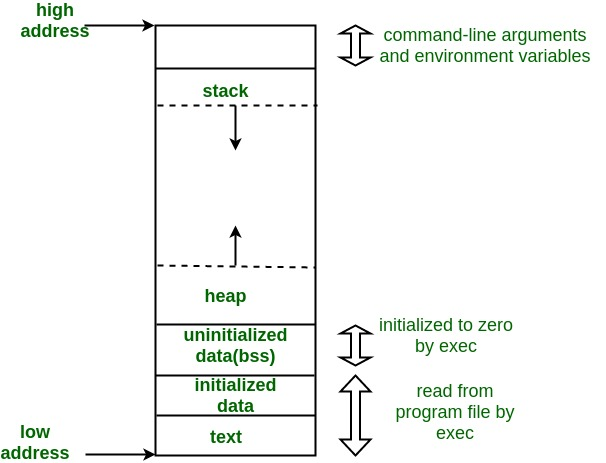
Here's a short description of each section starting from the bottom:
- text -- the code, e.g. program instructions
- initialized data -- explicitly initialized global/static variables
- uninitialized data (bss) -- uninitialized global/static variables, generally auto-initialied to zero. BSS -- Block Started by Symbol
- heap -- dynamically allocated memory. grows as structures are allocated
- stack -- used for local variables and function calls
Example of unsafe programming in C
Let's take a look at the problem with the following C program which asks you to guess a string and hints whether your guess was lexically less or greater.
- Copy the code into a file
unsafe.c - Compile with a local C compiler, for example,
cc unsafe.c - Execute program, e.g.
./a.out
Try with the following length guesses:
- guesses of string length <= 20
- guesses of string length > 20
- guesses of string length >> 20
Pay attention to the printout of
secretString!
Lecture Note: Switch to code
#include <signal.h>
#include <stdio.h>
#include <string.h>
#include <stdlib.h>
int main(){
    char loop_bool[20];
    char secretString[20];
    char givenString[20];
    char x;
    int i, ret;

    memset(&loop_bool, 0, 20);
    for (i=0;i<19;i++) {
      x = 'a' + random() % 26;
      secretString[i] = x;
    }
    printf("secretString: %s\n", secretString);
    while (!loop_bool[0]) {
        gets(givenString);
        ret = strncmp(secretString, givenString, 20);
        if (0 == ret) {
            printf("SUCCESS!\n");
	    break;
	}else if (ret < 0){
	    printf("LESS!\n");
	} else {
	    printf("MORE!\n");
        }
        printf("secretString: %s\n", secretString);
    }
    printf("secretString: %s\n", secretString);
    printf("givenString: %s\n", givenString);
    return 0;
}
A Brief Aside -- The people behind the languages
Who are these people?
- Guido Van Rossum
- Graydon Hoare
- Bjarne Stroustrup
- James Gosling
- Brendan Eich
- Brian Kernighan and Dennis Ritchie
Who are these people?
- Guido Van Rossum -- Python
- Graydon Hoare -- Rust
- Bjarne Stroustrup -- C++
- James Gosling -- Java
- Brendan Eich -- Javascript
- Brian Kernighan and Dennis Ritchie -- C